15 Clever Ways to Ask for Reviews

Today, more than ever, online reviews play the biggest role in shaping a business’s reputation. Positive reviews can be a powerful tool for attracting new customers and boosting trust. So, how can you ask for reviews in natural and effective ways? 

In this blog, we will explore 15 clever ways to ask for reviews that will encourage your customers to share their experiences and leave valuable feedback.

1. Highlight the Importance of Their Review

Whether in person or online, take a moment to genuinely convey to your customers how much their reviews matter to your business.

When a customer provides valuable insights or leaves a positive review, respond by expressing your sincere appreciation and letting them know that their feedback helps you serve them better in the future. This personal touch not only fosters goodwill but also encourages further engagement from your satisfied customers.

2. Craft an Uncomplicated Review Process

Make it easy for your customers to leave a review by providing clear, step-by-step instructions on where and how to leave a review. Keep it straightforward and remove any unnecessary or confusing steps. The simpler the process, the more likely your customers will leave a review.

For example, you could follow this email template we made for a fictional dog grooming business:

Hi [Custom name]

Thank you for choosing Happy Tails Dog Grooming! How did our team do today? Your feedback is important to us.

  • Click this link: [LINK] and it will take you to our review page on our website.
  • Rate your experience with a single click, from 1 to 5 stars.
  • Share a brief comment about your dog’s grooming if you’d like—it’s optional.
  • Click “Submit,” and you’re done! Your review will help us improve and better serve our furry friends.

Thanks again!

Sincerely,

The Happy Tails Team

This straightforward process makes it hassle-free for customers to share their feedback and encourages more reviews for the dog grooming business.

3. Use Personalization in Review Requests

You can improve your review requests by making them sound more personal. A great start is to use your customers’ first names. You can also try going the extra mile and talking about specific things from your past interactions with them. A little extra effort can go a long way toward making your requests feel more customized to each customer’s experience.

4. Include a Review Appeal in Your Follow-up Emails

Add a review request to your post-purchase or follow-up emails. Express your gratitude for their business and kindly request a review. Provide direct links or buttons for leaving reviews to make the process as convenient as possible for them.

5. Organize Review Competitions

Why not take a stab at making reviews feel fun and rewarding? Encourage customers to participate in review contests for a chance to win prizes, such as for the funniest review or best description of your product or service. Set clear guidelines and deadlines for the competition to ensure everyone is following the rules.

6. Incorporate Review Requests on Receipts

Whether printed or digital, make sure to include a review request or QR code on your receipts. Customers can quickly forget to leave feedback after leaving your store, so prompt them to share their feedback immediately after a purchase, offering them a quick and convenient option to do so.

7. Request Reviews in Face-To-Face Interactions

Train your staff to politely ask for reviews during in-person interactions. Create a script or guideline for employees to follow, and encourage a personal and friendly approach. Never be pushy, and do everything in your power to make the interaction as organic as possible.

8. Highlight Your Current Reviews

Embed Google reviews on your website and share them on social media pages. After a fantastic customer interaction, ask your most loyal customers for testimonials to build trust with online visitors. By sharing success stories and experiences from happy customers, you create a strong proof of your expertise.

9. Send a Handwritten Note

Do you have a regular customer who always goes out of their way to support your business? Show them how much you care by sending a handwritten note along with your review request. Express your appreciation for their business in a tangible and memorable way.

10. Call Them Directly

Call your most satisfied customers directly for their valuable feedback. Engage in a short and friendly conversation, express your appreciation, and kindly ask for their feedback. Remember to contact only clients you are absolutely confident would be okay with a phone call and respect their time and preferences.

11. Swap Reviews With Other Businesses

Team up with neighboring business partners to trade reviews. Share your honest experiences as partners and provide authentic feedback. This collaborative approach fosters a sense of community and mutual support.

12. Ask Whenever Customers Express Their Satisfaction

Pay attention to positive comments or compliments from customers, and seize those moments to capture feedback while the customer is happy. Train your employees to ask in these moments as well, keeping the request light and enthusiastic.

13. Write a Review Template for Your Customers

Provide your customers with a review template or guide for those who might need help getting started. Include prompts and examples to simplify the process for them. Remember, it should be entirely optional, and customers should be made aware they can always write their own unique reviews if they prefer.

14. Ask for Reviews via SMS

Send a polite and concise review request via text message. Include a link to the review platform for quick and easy responses. Keep the message brief, below 160 characters, and follow the Telephone Consumer Protection Act (TCPA) guidelines.

Here’s an example of what this request might look like:

“Your opinion matters! We’d love to hear about your recent experience with [Company Name]. Share your thoughts, and you could win [Incentive/Giveaway]. Click here to review: [Review Link].”

15. Utilize Social Media Mentions

Are happy customers talking about you on platforms like Instagram or Facebook with their friends and followers? Don’t let this feedback get away!

Tag or mention these extremely satisfied customers on your social media platforms and request reviews in a public and engaging way. While you’re at it, encourage others in the conversation to share their experiences as well.

And there you have it, 15 clever ways to ask for reviews that can significantly impact your local business’s online reputation. Whether it’s through personalized interactions, contests, or using the power of social media, encouraging your customers to share their feedback can be both effective and fun. Start implementing these strategies and watch the magic happen.

How to Create a Facebook Business Page

Today, it’s really important for businesses, no matter how big or small, to be visible online. One way to do that and connect with your customers is by creating a Facebook Business Page.

We’re going to show you how—step by step—you can make the most of this social media platform.

Key Takeaways

  • Why You Should Have a Facebook Business Page: With over 3 billion monthly active users, Facebook is a vital platform for businesses to engage with local customers and build loyalty.
  • Major Benefits for Local Businesses: A Facebook Business Page offers increased visibility, audience insights, cost-effective marketing/advertising, and valuable business analytics tools.
  • Setting Up Your Facebook Business Page is Easy: By the end of this guide, you will have the fundamental knowledge of how to create a professional-looking and functioning Business Page on Facebook. 

The Importance of a Facebook Business Page

Before diving into the specifics, let’s understand why having a Facebook Business Page is kind of a big deal.

With over 3 billion monthly active users, Facebook provides a vast platform to reach the people you want to connect with (Statista). Your Facebook Business Page serves as a direct hub for online engagement, allowing you to connect with your local audience, share updates, and build customer loyalty.

Overview of the Benefits for Businesses

Now that we have gone over why you should care about having your business on Facebook, let’s go over just a few of the perks of being on the platform:

Increased Visibility

When you have a Facebook Business Page, it can actually boost your chances of showing up in search engine results like Google. This means more people can find you online, even when they’re not on Facebook.

Audience Insights

With a Facebook Business Page, you get access to a treasure trove of information about the people who follow you. Facebook Insights gives you data on things like their age, where they live, and what they like. This knowledge can help you tailor your content to better suit your audience’s preferences and needs.

Cost-Effective Marketing

Facebook has a powerful advertising platform that allows you to create and run ad campaigns. The beauty of this is that you can target these ads specifically to reach the people who are most likely to be interested in your products or services. This means you’re not wasting money on ads that won’t work for your business.

Customer Engagement

Facebook is a very local-centric platform. People use it to swap and sell used goods, share common interests, and create neighborhood community pages. Having a Facebook Business Page gives you the chance to tap into this hyper-local space and interact with your customers directly, where they spend most of their time.

You can respond to comments, feedback, and messages, and even create posts that spark discussions. This engagement helps build a sense of community around your local business and fosters stronger loyalty among your customers.

Setting Up Your Facebook Business Page

Now, let’s get started on creating your Facebook Business Page:

Step 1: Log into Your Personal Facebook Account

Begin by signing in to your personal Facebook account. If you don’t have one, you’ll need to create one before proceeding to the next step.

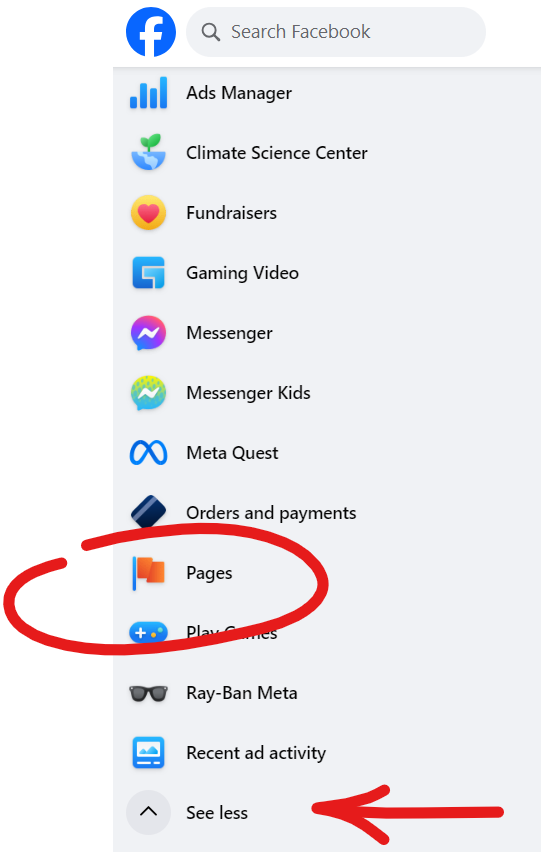
Step 2: Navigating to the Pages Section

Click on the “Pages” section located in the left sidebar of your Facebook home page. You might have to click “See more” to see the whole list of sidebar options.

How to Create a Facebook Business Page

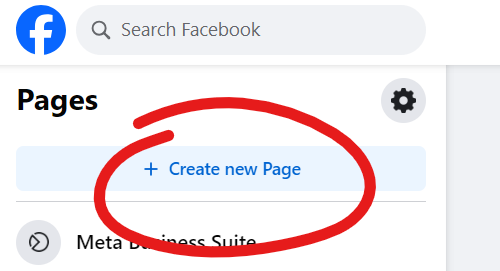
Step 3: Creating a New Page

Select “Create” to begin the process. 

How to Create a Facebook Business Page

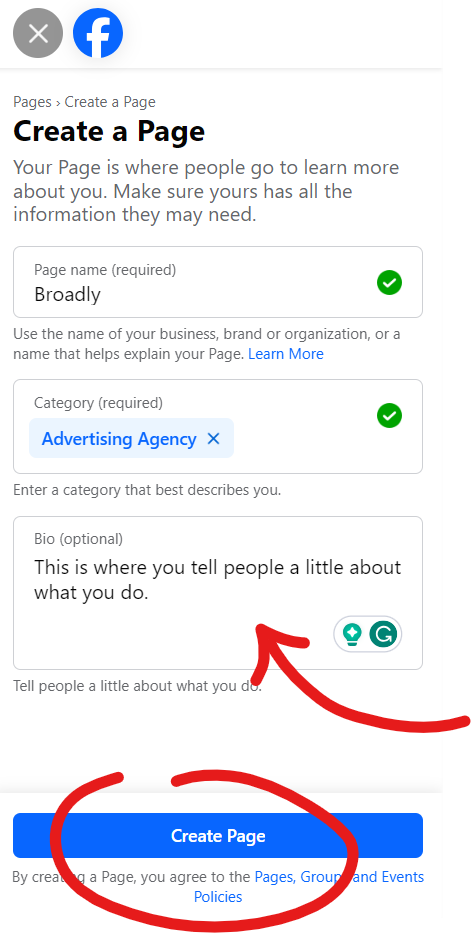
You’ll be prompted to choose a page type that best suits your business, such as “Local Business,” “Company or Organization,” or “Brand or Product.”

We filled out the form to show you what this kind of information should look like. Once you have checked for spelling and accuracy, you can click “Create page.”

How to Create a Facebook Business Page

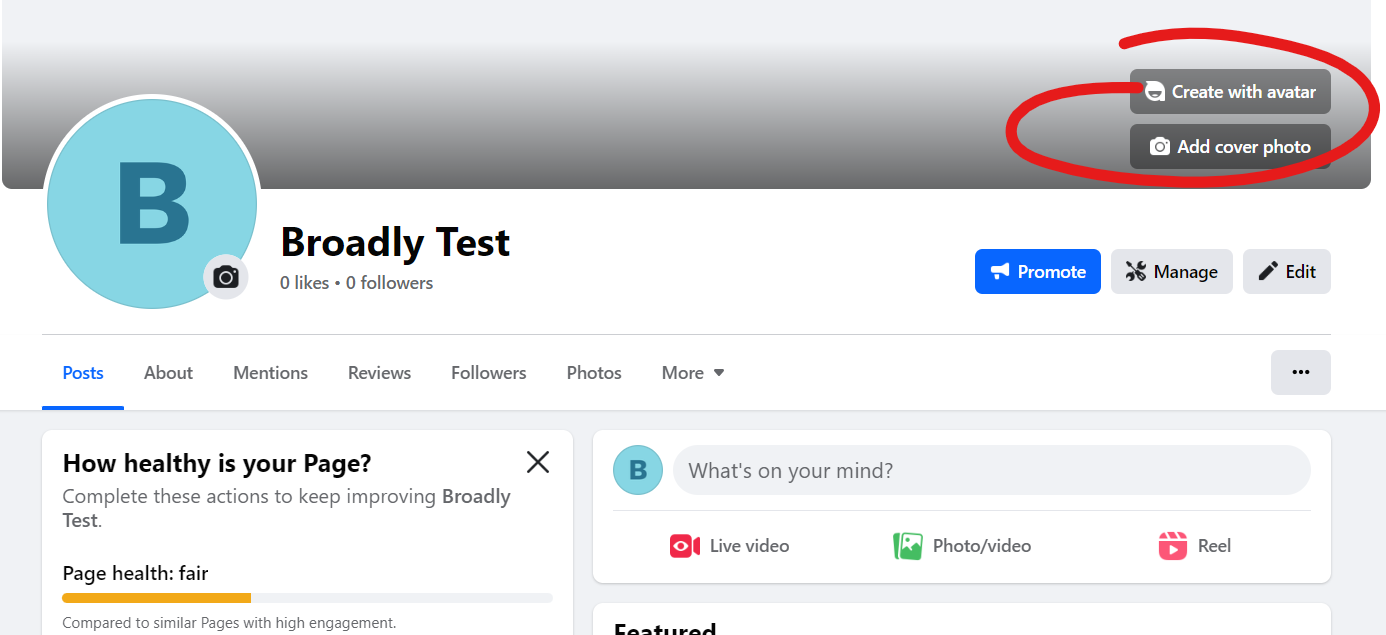
Congrats! You just made your very own Facebook Business Page!

You might be asking yourself, “Is that really all there is to it?” The short answer is yes! However, to get the most out of your business page, we recommend setting up your page with a few more settings and details. 

Page Configuration and Setup

Now, let’s configure and set up your Facebook Business Page.

Making Updates to Your Contact Information

You can update your business category and fill in important business details, including your business name, description, phone number, address, operating hours, website, email, and more.

If you are worried you made a mistake, no worries! You can always go to the About tab on your main page to adjust the finer details, such as highlighting your service area and adding additional contact info.

Follow steps 1–5 of the set-up process to complete your configuration.

Uploading a Profile Picture and Cover Photo

Enhance your page’s visual appeal by uploading a profile picture (usually your logo) and an eye-catching cover photo. This can be done using the buttons found on the far right of your business page.

How to Create a Facebook Business Page

Customizing Your Username (Vanity URL)

Tell us, which URL looks better to you?

Option A: facebook.com/broadly 

Option B: facebook.com/profile.php?id=6155249438286

That’s right, Option A. This version will be much easier for users to remember and can have a hand in helping you better connect with clients looking for you both on and off of the platform. However, when you look up the URL on your new page, you are most likely to see a big jumble of numbers and symbols rather than a perfectly branded link. 

So how can you make your Facebook business link look put together and professional, like your peers? The answer is customizing your username. 

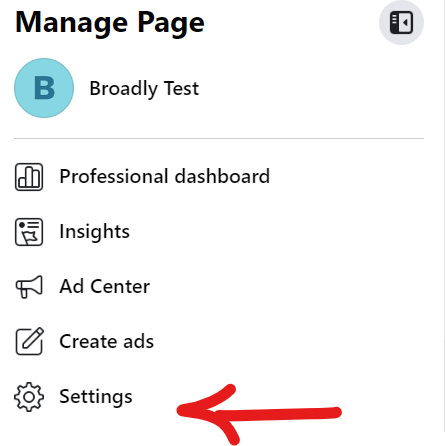
First, navigate to your settings from the main options on the left-hand side of your page.

How to Create a Facebook Business Page

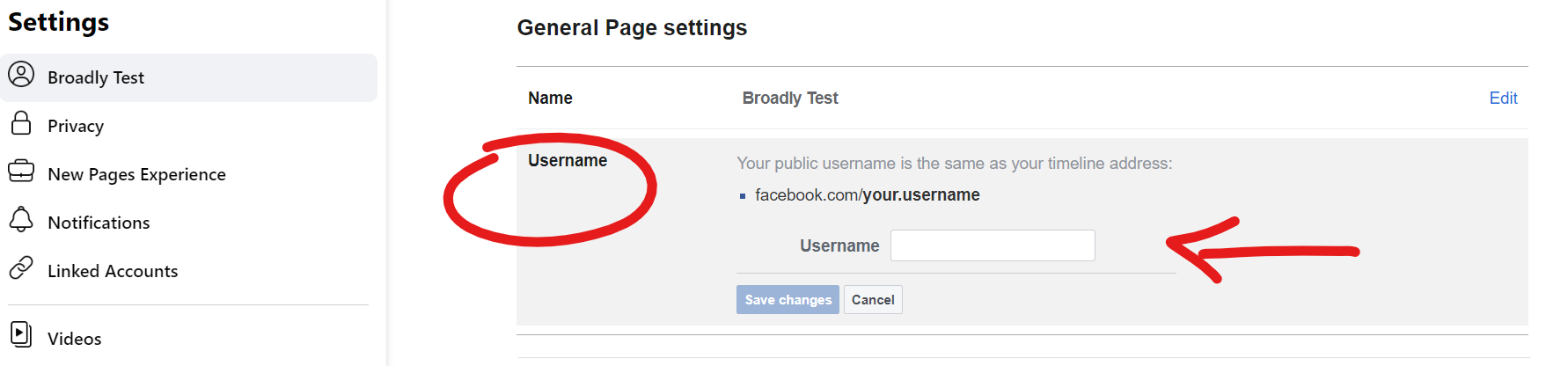
From there, you will see the General Page settings appear. Under the username section, fill in your preferred username to update your custom URL.

How to Create a Facebook Business Page

Hit “Save changes” to complete the process.

Crafting an Appealing About Section

Nothing is more impactful than a well-told origin story. So, what better way to distinguish yourself from the rest than by crafting a compelling About section? You can provide essential information about your business in this space to help users discover why they should do business with you.

Some key things you should mention include: 

A Detailed Business Description

Offer a comprehensive business description that highlights your products, services, and unique selling points.

Highlighting your Mission and Values

Communicate your business’s mission and values to connect with customers who share these common interests.

Accurate Contact Details

Ensure customers can easily reach you by including your website link and other contact details (double-check everything before you save).

Now Engage!

User engagement is key to building a loyal online community. Here are some things you can try to help you hit the ground running:

  • Respond to comments and messages promptly.
  • Encourage user interaction by running polls and hosting contests.

All in all, a well-managed Facebook Business Page is a valuable tool for your local business. By continually updating and engaging with your community, you can foster customer loyalty and drive meaningful growth.

Harness the potential of this hyper-local marketing and advertising tool to take your business to greater heights.

How to List a Business on Google

Where online presence reigns supreme, you can’t afford to play hide and seek with potential customers. It’s time to strut your stuff on the world’s biggest stage—Google!

Get ready for a journey that will make your business shine brighter than your competition with our comprehensive guide to listing your business on Google. Let’s dive in, shall we?

Key Takeaways

  • We will explore the importance of Google Business Listings,
  • Walk you through setting up your Google Business Profile,
  • And delve into some tried and true strategies for enhancing your online presence.

The Significance of Google Business Listings

Before we dive headfirst into the specifics, let’s explore why Google business listings matter:

Visibility

Google is the go-to search engine for 274.49 million unique visitors every single day (Statista). With over 81.37% of search traffic originating from Google, having your business listed on this platform ensures it will be visible to the customers you are hoping to reach.

Credibility

With such a high user base and strong policy adherence for businesses, a Google listing lends credibility to your company, making it appear more trustworthy to online users.

Engagement

Having a Google Business Profile (or GBP for short) means you can better interact with your customers. Connect with them by responding to reviews, adding posts, and sharing business updates. Keeping online users engaged helps you foster a stronger sense of community between them and your local business.

Setting Up Your Google Business Account

Now that we have discussed all the great things about having a presence on Google, let’s get you set up so you can start reaping the benefits:

Step 1: Creating a Business Google Account

If you don’t have one set up for your business just yet, we’ll first start by creating a Google account. This account will be the backbone for managing your business listing. Here’s what you need to do:

  1. Go to Google.com
  2. Locate the “Sign In” button in the upper right-hand corner, and click on it.
  3. Choose the option “Create an account.”
  4. From the dropdown menu, pick “For business or professional use.
  5. Follow the on-screen instructions to finish setting up your account.

Pro Tip: To avoid confusion and prevent security risks, it’s best to keep your personal Google account and business account separate from one another.

Step 2: Accessing Google Business Profile

Once your new business account has been created, visit the Google Business Profile website and log in using your new credentials by clicking the “Sign In” button in the upper right-hand corner.

Step 3: Starting the Listing Process

Click on the “Manage Now” button to initiate the business listing process.

Business Information and Details

Step 4: Searching for your Business on Google

If you spot your business along with its address, you’re already in the game and have a Business Profile. Let’s move forward.

No profile yet?

If your business listing doesn’t show up in the search results, don’t fret. Click on the little hamburger icon, located on the left side of the search bar. From there:

  • Hit “Add your business” to start creating your very own Google Business Profile.
  • Follow the prompts and provide some important info: your business name, category, address, service area, and, of course, your website address.
  • Next, you’ll need to share your business’s mailing address. Google calls this “verification,” but it’s really just one of the final steps on your profile setup journey.

Usually, Google likes to keep things snappy, and you should receive a nudge via email to complete your Business Profile and claim your listing shortly after you enter and submit all your information.

What if my Google business listing is already claimed by someone else?

It can feel really awkward when it appears that someone else has ownership of your business listing—after all, it is your business, not theirs. Google offers a few troubleshooting tips to help you request ownership of your business listing

Verification Process

Completing verification on Google requires a few extra steps. 

Step 5: Choosing a Verification Method

Google needs to be extra sure that you are who you say you are. And because of this, they will most likely ask you to select a second verification method, which can be through a postcard, phone call, or email.

Step 6: Requesting and Completing Verification

Follow the steps given to you by Google to request and complete the verification process. Once done, your business listing is officially claimed.

Completing the Business Profile

Now let’s move on to the fun part, making your Google Business Profile listing uniquely your own. You can enhance your listing with valuable information such as:

  • Detailed Business Descriptions: Craft a comprehensive business description, highlighting your products, services, and unique selling points.
  • High-Quality Visuals: Upload high-quality photos and videos that showcase your business’s offerings and ambiance.
  • Setting Business Hours: Define your operating hours and holiday hours, ensuring customers have accurate information.

Location and Service Area Settings

Help Google recommend you to local customers by setting up your location and the areas you serve. You can do this by:

  • Specifying Your Service Area: If your business serves a specific location, include your service area to target relevant customers more effectively.
  • Defining Delivery Options: If this applies to you, define your delivery options or service preferences (i.e., in-store pick-up or free delivery).

Managing Business Reviews and Ratings

Why not leverage customer feedback to your advantage? Some ways you can increase your star power on Google include:

  • Encouraging Customer Reviews: Ask your happy customers to leave a review. Genuine feedback can significantly impact your online reputation and give prospective buyers an extra nudge to do business with you.
  • Responding to Customer Feedback: Engage with customers by responding to their reviews, addressing concerns, and showing appreciation for positive feedback.

Posting Updates and Posts

Keep your audience regularly engaged with your business by posting relevant updates about what you’re up to. Some ways you can achieve this include:

  • Sharing What’s New: Share news, upcoming events, and special offers to keep customers informed and excited to stop by.
  • Highlighting Products and Services: Keep users in the loop on the kinds of things you offer. Seeing is believing, so make sure to include eye-catching professional photos and compelling descriptions that encourage them to click.

Adding Additional Users and Managers

As the saying goes, many hands make light work. When you are tied up in the weeds, it can greatly ease your mind to know another person can take up the helm. That’s why you should consider: 

  • Granting Access to Team Members: Add team members to help manage your listing collaboratively.
  • Setting Roles and Permissions: Define roles and permissions for each team member to ensure secure and efficient listing management.

Pro Tip: Remember, when adding people to your Google Business Profile, it’s smart to get everything in writing and signed by everyone involved before granting any permissions. Don’t hesitate to seek advice from a legal expert, especially if you’re handing over duties to an outside person or a freelancer.

40 Sample Text Messages to Delight Your Customers

When it comes to good customer service, communication is king and text messaging reigns supreme. For local businesses, leveraging the power of text messages can be the edge you need to stay competitive. 

In this article, we’ll explore the benefits of using text messages for customer communication and provide you with 40 sample text messages to customers to help you get started. Get ready to leave your customers pleasantly surprised and eagerly engaged with SMS updates!

Why Text Messages Matter for Your Business

Before we dive into the creative world of text messaging, let’s take a moment to understand why text messages are really great options for local businesses. People get bombarded with ads and emails regularly. Here are some stats from The Small Business Blog to put things into perspective:

  • On average, a regular person deals with a whopping 121 new emails every day.
  • These emails include spam, social updates, and promotional newsletters.
  • In 2020, a cybersecurity company called Kaspersky Lab estimated that nearly half (47.3%) of all email traffic is spam.
  • Out of all the emails sent daily, more than 3.4 billion are fake and potentially harmful, like those used in email attacks or phishing schemes.

People are weary, if not downright exhausted, by emails—and that’s where text messages can come in handy. Text messages cut through the noise. They add a personal touch to an interaction that can’t be ignored quite as easily as other forms of communication.

Important Things to Consider Before You Send Text Messages

According to Business.com there is a bit of red tape you need to navigate in order to abide by the Telephone Consumer Protection Act (TCPA). While text message marketing laws might seem intimidating and are fraught with legalese, they’re important to prevent consumers from being spammed.

Here are ways to meet these requirements and still promote your business effectively:

Get Clear Consent

When someone first joins your text list, you must provide them with all the necessary details:

  • Your business name
  • Why you’re texting
  • How often they’ll get messages
  • A statement about rates
  • Links to your privacy policy and terms
  • Instructions to opt-out

It might sound complicated, but it’s actually pretty straightforward. Here’s an example:

Hello [Name], thanks for signing up for [Company]’s Winter Sale! Expect deals every week. Message and data rates may apply. Text HELP for terms, STOP to quit.

Pro Tip: Keep things short. Carriers limit the number of characters in each text message to only 160. What happens if your message is above 160? It will send the message split in two, with the first 160 characters in one and the remainder in another. 

While sending multiple SMS messages is okay every once in a while, and some carriers can even merge these two messages together, these texts are often more expensive to transmit. Also remember, getting texted too often can bother customers and lead to them unsubscribing to your notifications, so be careful how often you ping them.

Use Keyword Shortcodes

A keyword shortcode is a word or phrase customers can text to a specific number to sign up for your texts. Make sure your disclaimer follows the CTIA guidelines and includes all the necessary details. When customers text the keyword, they’re giving their consent.

So, without further adieu, here are 40 sample text messages to help you better engage and communicate with your customers.

Welcome Messages

Welcoming a new customer is like rolling out the red carpet. It sets the tone for a great relationship. Here are five delightful welcome messages that will make your new customers feel right at home:

1. “Hey, [Customer Name]! Welcome to the [Company Name] community. Explore our range of [Products/Services] and enjoy exclusive offers just for you. Msg & data rates may apply. Msg frequency varies. Reply HELP for help; STOP to cancel. Visit [Website] to get started!”

2. “Hello there! Thank you for signing up for a [Company Name] membership. As a token of our appreciation, here’s a special discount: [Discount Amount] off your first purchase. Use code: WELCOME123 at checkout. Msg & data rates may apply. Msg frequency varies. Reply HELP for help; STOP to cancel.”

3. “Welcome, [Customer Name]! We can’t wait to see you at [Company Name] really soon. Have questions? Text HELP to reach us. Msg & data rates may apply. Msg frequency varies. Reply STOP to cancel.”

4. “Welcome [Customer Name], from all of us at [Company Name]. Your shopping journey with us begins now, and we’re here to assist in any way we can. Msg & data rates may apply. Msg frequency varies. Reply HELP for help; STOP to cancel.”

5. “Hey [Customer Name], you’ve officially joined the [Company Name] family. Ready to explore the best [Products/Services] around? Let’s make this experience exceptional! Msg & data rates may apply. Msg frequency varies. Reply HELP for help; STOP to cancel.”

Appointment Reminders

Missed appointments are a headache for both you and your customers. Ensure everyone stays on track with these helpful appointment reminders:

6. “Hi [Customer Name], don’t forget your appointment with [Company Name] tomorrow at [Time]. We’re looking forward to meeting you at [Location]. Need to reschedule? Reply ‘RESCHEDULE’.”

7. “Your appointment with [Company Name] is just around the corner on [Date] at [Time]. We’ll be ready to serve you at [Location]. See you soon!”

8. “Friendly reminder: Your appointment with [Company Name] is on [Date] at [Time]. Please arrive 10 minutes early, and if you have any questions, don’t hesitate to reach out to us at [Phone Number].”

9. “As your appointment with [Company Name] approaches, we want to ensure everything runs smoothly. See you on [Date] at [Time] at [Location]. Text 1 to confirm your appointment, 2 to reschedule.”

10. “Mark your calendar, [Customer Name]! Your appointment with [Company Name] is set for [Date] at [Time] at [Location]. We’re committed to making this a great experience. Text 1 to confirm your appointment, 2 to reschedule.”

Following Up with New Leads

Turning leads into customers requires timely follow-up. Here are five engaging text messages that will keep your leads interested:

11. “Hi [Lead’s Name]. This is [Employee] from [Company Name]. I’d love to schedule a quick 10-minute chat to discuss your needs. Schedule it here: [link] “

12. “Hi, [Lead’s Name]. This is [Employee]. Thank you for your interest in [Company Name]. I’d love to connect over a quick call. Let’s find time to chat: [link]”

13. “Hey there, [Lead’s Name]! Thank you for your interest in [Products/Services]. Let’s schedule a meeting to discuss how we can meet your needs. Book here: [link]”

14. “Great things are on the horizon, [Lead’s Name]. Let’s schedule a chat about how [Company Name] can make your goals a reality. What’s your preferred time for a quick discussion?”

15. “We’ve got exciting solutions for you, [Lead’s Name]. When can we connect to talk about how [Company Name] can meet your unique needs?”

Promotional Text Messages

When you have exciting promotions to share, let the world know! These five promotional text messages will have your customers rushing to your door:

16. “[Customer Name], unlock amazing deals at [Company Name] today! Shop [Product/Service] and enjoy up to [Discount Percentage] off until [Date]. Visit us at [Location] or explore online at [Website Link]”

17. “The savings continue at [Company Name]’s [Season] Sale! Grab your favorite [Product] at a discount of [Discount Amount] until [End Date]. Hurry before it’s gone!”

18. “Don’t miss out on our exclusive offer, [Customer Name]! Get [Product/Service] with a [Discount Percentage] discount. Limited stock available, so shop now at [Website] or our store at [Location].”

19. “Here’s an offer you can’t resist, [Customer Name]! Discover [Product/Service] with a whopping [Discount Amount] off. Your dream deal awaits at [Company Name].”

20. “Ready for unbeatable savings, [Customer Name]? Grab your [Product/Service] with a massive [Discount Percentage] discount. Visit us today at [Location] or shop online at [Website].”

Ask for Feedback and Reviews

Customer feedback is more precious than gold. These five messages will encourage your happy customers to share their thoughts and maybe win a little something in return:

21. “Your opinion matters! We’d love to hear about your recent experience with [Company Name]. Share your thoughts, and you could win [Incentive/Giveaway]. Click here to review: [Review Link].”

22. “We’re constantly striving to improve. Share your feedback on your recent purchase from [Company Name], and receive your next [Product] on us! Click here to review: [Review Link].”

23. “Help us enhance your experience with [Company Name]. Share your feedback and be entered to win a [Prize/Gift]. Click here to review: [Review Link].”

24. “Your voice matters to us, [Customer Name]. Leave a review of your recent experience with [Company Name] and have a chance to win big. Click here to review: [Review Link].”

25. “Ready to have your say, [Customer Name]? Review your recent interaction with [Company Name] and seize the opportunity to win a [Prize/Gift]. Click here to review: [Review Link].”

Order Confirmation

Customers love to know that their orders are in good hands. Use these order confirmation messages to keep them excited:

26. “Congrats, [Customer Name]! Your order #[OrderNumber] is confirmed. We’re packing it up, and it will be on its way to you by [Expected Delivery Date]. Track your order at [Order Tracking URL].”

27. “Great news! Your order with [Company Name] has been successfully placed. Order #[OrderNumber] will be dispatched on [Expected Delivery Date]. Keep an eye out for shipping updates.”

28. “Thanks for shopping with [Company Name]. Your order #[OrderNumber] is confirmed. You can anticipate delivery on [Expected Delivery Date]. For order updates, visit [Order Tracking URL].”

29. “The moment you’ve been waiting for, [Customer Name]. Your order #[OrderNumber] with [Company Name] is confirmed. It’s on its way, and you can track it here: [Order Tracking URL].”

30. “Exciting times, [Customer Name]! Your order #[OrderNumber] is confirmed and will be sent to you by [Expected Delivery Date]. Keep an eye on your delivery status at [Order Tracking URL].”

Rewards for Repeat Customers

Loyal customers deserve a little extra love. Here are five messages to show your appreciation:

31. “Hello, loyal customer! As a token of our appreciation, we’re offering you [Discount Percentage] off your next purchase. Use code: [CODE] at checkout. Enjoy your savings!”

32. “You’re a valued member of the [Company Name] family, [Customer Name]! Your next purchase comes with a special reward—[Free Product] when you spend [Minimum Amount]. Redeem in-store or online!”

33. “It’s customers like you who make us smile, [Customer Name]. Get [Discount Amount] off your next order as a thank-you for your continued support. Use code: [CODE] at checkout.”

34. “Thank you [Customer Name], for being our customer for [Number of Years] amazing years! Enjoy [Discount Percentage] off your next purchase at [Company Name]. Use code: [CODE] and save!”

35. “Every purchase is a step toward fantastic rewards, [Customer Name]. Your next order with [Company Name] is [Discount Percentage] off. Use code: [CODE] and claim your savings!”

Payment Reminders 

Gentle payment reminders ensure you get what’s due without being intrusive. Here are five tactful payment reminders to keep things on track:

36. “A friendly reminder, [Customer Name]. Your payment of [Amount] for invoice #[InvoiceNumber] is due on [Due Date]. Have questions? Reply HELP for assistance.”

37. “This is a courtesy reminder that your invoice #[InvoiceNumber] with a total of [Amount] is awaiting payment by [Due Date]. To settle, click here [Payment Link] or contact us at [Phone Number].”

38. “Your upcoming payment is on our radar, [Customer Name]. Please ensure payment of [Amount] for invoice #[InvoiceNumber] by [Due Date]. If you have any questions, feel free to reach out.”

39. “It’s that time again, [Customer Name]. Your invoice #[InvoiceNumber] for [Amount] is due on [Due Date]. For quick and easy payment, click here [Payment Link] or call us at [Phone Number].”

40. “Keeping everything in order, [Customer Name]. Your payment of [Amount] for invoice #[InvoiceNumber] is expected by [Due Date]. To make the process easy, click here [Payment Link] or contact us at [Phone Number].”

Embrace the power of text messages and watch your customer communication game soar to new heights.

These 40 sample messages have you covered in various scenarios, but remember, thoughtful communication resonates with your customers more than a template, so experiment and find what works best for you.

How will you use these sample texts to delight your customers?

Responding to Bad Reviews: The Dos and Don’ts

In the wild world of online reviews, we get it—a single not-so-good comment can really put a damper on even the best of us. But don’t worry, because we’ve got your back!

Join us as we explore the ins and outs of responding to bad reviews and ways of turning them into opportunities for growth.

The Power of a Thoughtful Response

Let’s kick things off by talking about the magic of a well-thought-out reply. Bad reviews really sting, but a carefully crafted response can help turn things around for the better. People truly value honesty and transparency.

When you choose to try to make things right for a disgruntled customer, you have the opportunity to rebuild the relationship and showcase publicly to potential customers that you care and value their business. 

Crafting the Perfect Response

How can you do this for yourself? We have compiled a list of important things to keep in mind before you start responding to bad reviews:

  1. Say No to Stock Replies and Yes to Personalization: Show them you care with a response that’s as unique as your business.
  2. Thank Them for the Review: A little gratitude goes a long way in building bridges.
  3. Respond ASAP—The Sooner, the Better: Speedy replies show you’re on the ball and ready to make things right. Make an effort to respond to bad reviews within an hour of receiving it.
  4. Put Yourself in Your Customer’s Shoes: Seeing the situation from their perspective helps them feel validated—let them know you’re listening and there to help.
  5. Apologize Effectively Without Taking the Blame: It is perfectly okay to apologize for a mistake you made, but never take the blame for things that aren’t your fault or are outside of your control.
  6. Offer Solutions and Show Proactivity: Prove you’re not just all talk—suggest fixes and show you’re committed to improvement.

The Dos and Don’ts of Responding to Bad Reviews

Dos

Acknowledge the Issue

Don’t put things off and avoid the problem; let your customers know you’ve heard their concerns loud and clear.

Keep it Professional

Stay level-headed when writing your response, even if the review’s got you seeing red. If you are struggling with this, it’s ok to take a moment, walk away, and reassess your approach once you’re more calm. Trust us, it’s worth it.

Take Things Offline 

Some things are better discussed privately, such as account details and other sensitive customer information. To avoid public escalations and to protect your customers’ private information, invite them to connect with you over a phone call or via email.

Don’ts

Ignore or Delete

Deleting a bad review is like sweeping dust under the rug—not a good look. Believe it or not, it is better to have a few bad reviews than none at all. With all the fake businesses popping up on places like Instagram and TikTok with hundreds of illegitimate 5-star reviews, buyers are weary about who they should trust (NBC Chicago). Make the answer easy for them by owning up to your flaws and keeping bad reviews public.

When you see a bad review, don’t delete or ignore it; instead, do the right thing and reply with a thoughtful and professional response.

Emotional Responses 

We’ve all been there, but keep it cool when representing your business online. It is a lot easier to deliver a clear and professional response when you’re feeling more level-headed. When in doubt, ask a team member or business partner for their opinion on your first draft to make sure you are coming across in a way that best reflects your brand.

Generic Apologies 

We’ve all seen it before, you check out the comments about a product, and every bad review is met with the same copy and pasted response. It feels ingenuine and makes the business look like they don’t really care. That’s why you need to keep things personal if you want to win back the hearts of your unhappy customers.

Proactive Reputation Management

Alright, let’s talk about going on the offense with your reputation. Proactive Reputation Management is like having a protective umbrella over your business on a dreary day.

When negative comments start to rain down on you, your large collection of positive feedback is there to soften the blows and back up your integrity. Here’s a game plan for a strong proactive reputation management strategy:

1. Encourage Positive Reviews

Why: Positive feedback is your best protection from bad reviews. They boost your credibility and drown out the negativity.

How: Politely ask satisfied customers to share their experience, either through email, text message, or in person, when they visit your establishment. Consider incentives like discounts or exclusive offers to sweeten the deal to get them clicking.

2. Use the Good to Counter the Bad

Why: Ever heard of fighting fire with fire? Well, in this case, it’s fighting bad reviews with good ones to maintain your business’s online star power.

How: When you get a shining review, showcase it! Post your positive feedback on social media, embed it on your website, and link these great reviews to Google to make sure every potential customer knows about the positive experiences others have had doing business with you.

3. Monitor and Address Common Complaints

Why: An ounce of prevention is worth a pound of cure. Identifying patterns can help you fix issues before they become recurring problems.

How: Regularly monitor reviews and look for common themes, phrases, or keywords. If you spot a trend, take action to address the root cause before things can get worse. 

Don’t be afraid to let people know you are working on a fix, and update your community once a solution has been found. People feel empowered when they know their feedback was taken into consideration and are more inclined to do business with you again.

Training Your Team for Effective Responses to Bad Reviews

Your team is the heart and soul of your business, and turning them into reputation rockstars is the key to a stronger online reputation. Here’s how to make it happen:

1. Ongoing Customer Service Training

Why: Your team is on the front lines of every customer interaction. Equip them with the skills to handle it like pros and be your strongest asset in brand advocacy.

How: Regularly provide training sessions on effective communication, conflict resolution, and customer-centric practices. There are many great online resources available to you and your team.

2. Create a Playbook for Review Responses

Why: Consistency is key. Having a playbook ensures that every response aligns with your brand voice and values.

How: Develop guidelines for responding to different types of reviews, be it good, bad, or neutral. Not quite sure what those responses should look like? Research real-life examples for inspiration.

3. Companies with Well-Prepared Customer Support Teams

It’s always a good idea to learn from the success stories of others. Here’s an example of a business that turned negative situations into positive outcomes through effective team responses:

Reputation Management Pro: Chewy

Chewy, the online pet supply store, really knows how to handle things when customers are going through a tough time, especially when they’ve lost a furry friend. They step up and show some real empathy, making their reputation management strategy stand out in a good way.

Take this one situation featured in a People Magazine article. A customer had to cancel their auto-shipment of pet food because their beloved pet, Zeo, had passed away. Now, instead of just handling the cancellation, the Chewy rep took the time to let the customer share memories of Zeo.

What’s even more heartwarming is that Chewy goes the extra mile by sending handwritten cards and flowers to folks who’ve lost a pet. It’s not just about making cancellations and refunds easy; it’s about being there with kindness during a tough time.

Realizing the Positive Side of Negative Feedback

Negative feedback can be hard to swallow at times, but it’s also a goldmine of opportunities. Let’s flip the script on criticism and see it for what it really is:

1. Using Criticism for Continuous Improvement and Growth

Why: Criticism can oftentimes be feedback in disguise. Embrace it, and you’ll find areas for improvement you might have overlooked.

How: Analyze negative comments for constructive insights. Use them as a roadmap for making meaningful changes. For example, if you notice people mentioning that the services page or pricing is hard to understand, take the time to clean things up to make the customer experience more enjoyable.

2. Transforming Unhappy Customers into Loyal Advocates

Why: Believe it or not, a customer who is passionate enough to leave detailed feedback about their experience might also be willing to give your business a second chance. Going the extra mile to fix your customer’s problems can turn them into your biggest fans.

How: Respond promptly, apologize sincerely, and offer clear solutions with an expected turnaround time. Be transparent, compassionate, and professional, and your once-unhappy customer may soon be singing your praises.

As the world of online reviews keeps evolving, so does your chance to shine. Responding to bad reviews isn’t just damage control—it’s your chance to build a brand that bounces back stronger.

Tips for Responding to Positive Reviews With Examples

Getting online customer reviews on Google, Facebook, and Yelp has become one of the most important ways to market your business. In fact, 93 percent of consumers say online reviews impact their purchasing decisions.

That’s why it’s so crucial that you tidy up your online presence and ensure you’re putting your best foot forward. Once you’ve nailed down the process of asking for reviews, it’s time to make the most of your positive reviews.

The first step is to actually respond to them. Yes, all positive reviews should be acknowledged and not taken for granted. You will want to thank the reviewer promptly and be concise and authentic. Then, you should include a call-to-action for further marketing purposes.

Below, we will break down all of these steps and include example templates to ensure your business is ready to respond to positive reviews with purpose.

Key Takeaways

  • Reply to Positive Reviews: It’s important to respond to positive reviews to show your appreciation and encourage customer loyalty.
  • Effective Response Tips: To respond well, thank the reviewer, do it promptly, keep it short, and invite them to take action, like sharing their experience on social media.
  • Share Positive Reviews: Share these good reviews on your website and social media to attract more customers. It’s all about making the most of your positive feedback!

Why You Should Respond to Positive Reviews

Positive reviews show you who your cheerleaders are. These are the promoters of your business—the people who rave about your company and want to tell their friends about it. These are also the people who will return to your business again and again, which is important considering it costs almost seven times more to attract new customers than it does to keep the ones you already have.

Without these positive reviews, your professional business can be drowned in negative reviews that come up, especially considering it takes 12 positive customer experiences to make up for one negative review. After you receive new positive reviews, phrase your responses to hype up your cheerleaders even more and encourage them to be your own special army of free-marketing.

How to Respond to Positive Reviews

Here are a few of the things you should keep in mind when responding to positive reviews for maximum impact:

1. Thank the Reviewer

The reviewer just said something nice about your company—it would be poor manners if you didn’t thank them! Be sure to always thank the reviewer first and foremost, so they know that their kind deed didn’t go unnoticed. After all, they didn’t have to leave you a nice review or give you feedback at all. Show your appreciation and make it personal. Reference specific things they mentioned, like agreeing if they point out one of your stellar employees.

The following example shows you actually took the time to read and appreciate what your customer wrote.

Thank you so much for your kind words, Jane. We really appreciate you taking the time out to share your experience with us—and we agree—Jordan is truly a gem to have on our team! We count ourselves lucky to have customers like you. We look forward to working with you again in the future! 

2. Respond Quickly to Positive Reviews

Reviews are often left immediately following a purchase, visit, or specific experience. Time is of the essence for you as a business owner. If you let a positive review sit for months before responding, it looks like you didn’t care at all about it, even though your customer cares a lot about you.

By responding as soon as you can, you show how appreciative you are of the customer—it’s a simple action that will accompany your words of thanks. Otherwise, if you wait too long, the customer will be alerted to the late response and reminded that they were ignored. They will also probably have moved on and forgotten about you if you don’t stay top-of-mind.

3. Keep It Short

Nobody likes to read lengthy responses; keep them short and sweet. Do your kind customers a favor and keep your message brief but impactful. If you say too much, the value of your words could decrease, and you might even come off a little too enthusiastic. Short and simple wins every time.

Example:

Thanks for the awesome review, Dan! We work hard to meet expectations like yours, and we’re happy to hear we hit the mark for you. Come back and see us soon. Cheers!

4. Be Authentic and Personal

Most people agree that robots pretending to be humans on the internet are not cool, so don’t act like one! Customers can immediately tell if they are getting a cookie-cutter automated response versus a warm, real human connection. This person took the time to talk about your company, so the very least you can do is give them the decency of a real response. Don’t forget to sprinkle in specifics or personality while keeping it short.

Example:

George, thank you for the great review! We’re so happy you loved your experience, and we can’t wait to have you back for your next service appointment. Until then, we’re here if you need anything.

5. Invite Them to Take Action

Responding to positive reviews is great, but if you want to maximize your success, it’s important to add in a small call-to-action. Make it feel natural. It could be anything: asking them to share their experience with their friends, sign up for another appointment, or find you on social media. It’s up to you and your business goals. But make sure to strike while the iron’s hot and invite reviewers to take further action while they’re happy.

Example:

Thank you for the kind words, Laura! We’re so happy your visit went so smoothly. Would you mind sharing with your friends who are due for a service appointment, too? We’d love to continue providing great service to awesome customers like you. Thanks again!

6. Share the Positive Review

Finally, while you’re asking reviewers to share, you should be sharing as well! Share the good news of the good reviews on your social channels—people who follow you but don’t do business with you (yet) might be prompted to look more into your services or products. 

For example, you can take a positive Google review and post it on your business’s Facebook page or add it to the testimonial section of your website so any visitors know right off the bat what to expect. Get the good news out there for everyone to see.

Other Examples of Great Responses to Positive Reviews

Responding to positive reviews is more than just acknowledging praise; it’s an opportunity to foster customer loyalty and show genuine appreciation. When customers take the time to leave glowing feedback, it’s a reflection of their satisfaction and loyalty, so do everything in your power to retain this loyalty by showing how much it means to you.

In this section, we’ll explore even more examples of excellent responses to positive reviews, emphasizing the significance of genuine gratitude and the potential to strengthen your brand’s reputation.

Here are even more examples of great responses to positive reviews:

We’re absolutely delighted to receive your 5-star review! We’ll be sure to pass your kind words on to our dedicated store team to inspire their ongoing commitment to excellence.

This response not only expresses gratitude but also highlights the impact of the review on the store team. It reinforces the idea that positive reviews motivate employees to maintain high standards.

Your decision to share a 5-star review with us fills us with immense gratitude. It’s customers like you who make our journey all the more rewarding.

This response recognizes the act of sharing a positive review as a meaningful gesture. It establishes a connection between the customer’s action and your business’s journey.

We genuinely thank you for your generous 5-star review. Your support as a customer and your willingness to spread the word about us means the world. Remember, we’re here for you, anytime.

This response not only expresses gratitude but also encourages further engagement. It invites the customer to return, fostering a lasting connection that you need to hold onto.

Your 5-star review is truly appreciated, and we can’t express our gratitude enough. Sharing your rating with us and the broader community is such a kind gesture.

This response emphasizes the act of sharing the review as a kind gesture, reinforcing the idea that positive reviews benefit not only your business but also the local community.

Thank you so much! Your dedication to leaving us a 5-star rating warms our hearts, and we greatly appreciate you taking the time and effort to do so.

This response recognizes the customer’s dedication and effort, reinforcing the idea that their action is genuinely valued.

We’re deeply appreciative of your 5-star review and the time you took to share your positive feedback. Thank you!

This response expresses deep appreciation and acknowledges the customer’s effort in sharing their positive feedback.

Thank you for your glowing review! We’re thrilled to hear that you enjoyed your experience with us. Our team strives to deliver exceptional service, and it’s wonderful to know we hit the mark. We look forward to welcoming you back soon!

This response not only expresses gratitude but also highlights your team’s commitment to exceptional service. It also anticipates the customer’s return.

We’re delighted to hear about your satisfaction with our product and service! Providing top-quality products and excellent customer service is our priority. Thank you for choosing us, and we hope to serve you again in the future.

This response emphasizes the customer’s satisfaction and reiterates your team’s commitment to quality.

Thank you for your kind words! We’re pleased to hear that you had a wonderful experience with us. We can’t wait to welcome you back on your next visit.

This response expresses pleasure and anticipation of the customer’s return, creating a warm and inviting atmosphere.

We’re grateful for your loyalty and your kind words! It’s customers like you who inspire us to maintain the highest standards. We’re committed to delivering exceptional products and experiences, and we’re excited to continue serving you for years to come.

This response acknowledges the customer’s loyalty and inspires a sense of commitment and appreciation for the customer.

Thank you for sharing your positive experience! Our team is committed to going the extra mile for our customers, and we’re thrilled to hear that it made a difference for you. Your satisfaction is our motivation, and we’re here whenever you need us.

This response emphasizes the team’s commitment and positions the business as responsive and dedicated to helping.

We’re pleased to hear about your positive shopping experience! Our team takes pride in providing assistance and maintaining a well-organized store to make your visit an enjoyable one. Thank you for your kind words, and we look forward to serving you again in the future.

Responding to positive reviews is an art that goes beyond simple thankfulness. It’s about building connections, fostering loyalty, and creating a positive image of your business in the eyes of your customers.

By acknowledging and appreciating customers who take the time to leave positive feedback, businesses can strengthen their relationships and inspire ongoing support.

So, remember, the next time you receive a glowing review, respond with authenticity and gratitude, and watch how big of a difference it makes.

Final Thoughts

We hope you’ll realize the importance of responding to positive reviews. By doing this small service, you can reap big rewards and gain some loud internet cheerleaders.

Just remember to thank your reviewer, be timely, concise, and personal, and invite them to take action. Then, share the positive online reviews so everyone can see how great your company is.

Happy responding!

Reputation Management Guide

Welcome to the ultimate reputation management guide. In this article, we will explore the world of reputation management and understand its importance for local businesses. Managing your reputation is a key aspect of running a successful business, and that means it extends beyond the face-to-face interactions you have with your customers every day. 

We’ve compiled this guide to help you better navigate online and offline reputation management, so look forward to our tried and true strategies, tools, and expert tips to build and maintain a positive reputation for your local business.

What Is Reputation Management?

Reputation management involves actively influencing and controlling how others perceive your business—this includes customers, competitors, and the general public. It involves managing your reputation both online and offline, as your business’s image can and will be shaped by how you navigate digital and real-world experiences.

Why Is Reputation Management Important for Small Businesses?

Whether you like it or not, the way people perceive you online plays a crucial role in shaping your overall reputation. Everyone has a smartphone now, and customers will more often than not turn to the internet to learn about what’s available in their area before making a decision. 

Therefore, having a positive online image that makes you shine brighter than the rest is what you need to earn their cold, hard cash. Here’s how you can manage it:

Online Reputation Management

Tools for Monitoring Your Online Presence

  • Google Alerts and Social Media Monitoring: These tools help you keep track of mentions and discussions related to your business on the internet.
  • Online Review Platforms: Monitoring reviews on platforms like Google, Yelp, and Facebook allows you to stay informed about what customers are saying.
  • Social Listening: This involves tracking conversations on social media to understand how your business is perceived.

Respond to Online Feedback

Managing online feedback, both positive and negative, is the secret to exceptional reputation management. By engaging with your customers online, you can demonstrate your commitment to their satisfaction and continued business.

Build a Positive Online Presence

To enhance your online reputation, consider these strategies:

  • Social Media Engagement: You know what sets you apart, but do your potential customers? Active and engaging social media profiles can help you shape your unique value proposition and create a positive brand image.
  • Content Marketing: Creating useful and engaging content helps showcase your expertise and reliability.
  • Partnerships: Collaborating with local influencers, charities, or causes can boost your credibility and reach a wider audience.

Offline Reputation Management

While your online reputation is important, your offline reputation carries equal weight. Here’s what you need to do to improve it:

Provide Exceptional Customer Service

As the saying goes, word travels. So, make sure the latest gossip going around about you is nothing but good news. Offering exceptional customer service leaves a positive impression on your patrons and can potentially lead to positive word-of-mouth referrals.

Community Involvement and PR

Engaging with your local community and participating in public activities shows the people living there that you are invested in giving back to your community. If you do something good for others, make sure to show it off. Write a blog post about it on your website, share photos on social media, and try to get noticed in the local newspaper. 

Handling Crises and Negative Press

While we always hope it will never happen, it is better to expect the best and plan for the worst. That means in times of crises or negative press, a well-prepared strategy can help you address issues and protect your reputation.

How to Build a Reputation Management Strategy

Creating a reputation management strategy involves several steps:

  1. Research, Observe, and Evaluate Your Online Image: Understand how your business is currently being perceived online through reviews, comments, and mentions. Is there something you could be doing better?
  2. Formulate Multiple Strategies: Develop plans to manage your reputation, both reactively and proactively.
  3. Establish a Communication Style Guide: Create guidelines for addressing comments and feedback professionally and consistently.
  4. Share Your Plan: Communicate your reputation management strategy with your team or organization to ensure everyone is on the same page.
  5. Implement Changes: Good or bad, all feedback is valuable, so make improvements based on these comments to enhance your reputation.
  6. Keep Records: Document your progress and outcomes as you work to build and maintain a positive reputation. That way, you can learn from your mistakes and devise better strategies.

Tools and Strategies for Reputation Management

Reputation management relies on a combination of tools and strategies. In this section, we are going to dive deeper into the key elements of reputation management to help you make the most of these tools:

Online Reputation Management Tools

Do you need to keep close tabs on what people are saying about you but are short on time? That’s when a reputation management tool could come in handy. Let’s take a look at a few of the most popular ones out there:

1. Social Monitoring Tools

These tools allows you to keep track of your brand’s mentions and conversations on various social media platforms. You can quickly identify what people are saying about your business and respond accordingly.

2. Google Alerts

Set up alerts for your business name, products, or relevant keywords. Google will notify you when new content related to your business appears online, allowing you to stay informed.

3. Review Tracking Software

There are various tools designed specifically for tracking and managing online reviews. They help you monitor review platforms like Yelp, Google, and Facebook, making it easier to respond promptly to customer feedback.

Reputation Repair Strategies

If your reputation has taken a hit, all is not lost. Reputation repair strategies can help you bounce back and regain the trust of your customers. Here’s how:

1. Professional Responses to Negative Reviews

When negative reviews surface, your response can make a big difference. Craft professional, empathetic, and solution-oriented responses to address customer concerns. Offer to make amends and resolve issues to rebuild trust.

2. Request Reviews

Encourage satisfied customers to leave positive reviews to counterbalance the negative ones. A steady flow of positive feedback can overshadow past issues and even boost your reputation.

3. Incorporate Feedback

While we would all like to simply sweep bad comments under the rug, it’s best to actively address the issues raised in negative reviews. Negative reviews are often the most honest feedback you could receive, so use it as an opportunity to make improvements in your products or services. It helps you to demonstrate your commitment to customer satisfaction and showcase the positive changes you’ve made.

Proactive Reputation-Building Strategies

Being proactive is key to long-term success. Consider these strategies to strengthen your reputation:

1. Customer Service Excellence

Outstanding customer service is a cornerstone of a positive reputation. Make sure all your staff are trained to best meet your client’s needs, address customer concerns promptly, and go the extra mile to exceed expectations.

2. Showcase Your Expertise

Position your business as a local expert by sharing valuable content, insights, and knowledge. This not only educates your audience but also builds trust and credibility.

3. Engage with the Community

We can’t emphasize this enough. Active community involvement and engagement can make all the difference for the folks you serve. Supporting local causes, participating in events, and contributing to your community is a great way to stand out from the rest.

Reputation management is an essential aspect of running a successful local business. Implement the strategies and tools outlined in this guide, and get ready to get noticed for all the right reasons.

How to Get 5-Star Ratings On Your Facebook Page

5-star ratings on Facebook are like digital badges of excellence that serve as a potent tool in shaping the online identity of your business. Positive ratings contribute significantly to a business’s reputation, acting as beacons of trust that draw potential customers in. 

If you want to get 5-star ratings on your Facebook business page, we’ve got you covered.

Providing Excellent Service

Happy customers are like your business’s biggest cheerleaders. Because of that, the best place to start is by providing excellent service to every customer. Nail that, and you’re on your way to a review-packed wonderland.

Train your team to be customer satisfaction pros. Anticipate needs and solve problems with flair, and you’ve just earned yourself a round of applause in the form of stellar reviews. Equip your employees with the right tools, such as conflict resolution training and marketing materials so that they can confidently sell the business and its products, and watch as they create customer service fireworks.

Why settle for good when you can be downright awesome? Little gestures like handwritten notes, small discounts, or a sprinkle of personalized magic on the delivery side of things also show your customers that you’re not just in it for the business—you’re in it for the customers!

Encouraging Happy Customers to Leave Reviews

Reviewing should be easy to do, as this makes it that much more rewarding for customers. Make it a seamless, integrated part of your customer journey.

Start by being where your customers are. Whether it’s email, phone, or the world of social media, let them talk to you. It’s not just good service; it’s a direct route to those precious reviews.

Time is also of the essence. Respond fast to concerns, solve problems, and turn potential negatives into shining positives. When dealing with concerns, try to take them offline so that multiple messages can be given, which allows for a more nuanced and thorough approach.

Finally, don’t be shy—ask for those reviews! Make it part of your after-service dance. Get the timing and frequency right, and you’ll have a parade of positive reviews marching your way. Try various channels as well, be it email, in-person, or social media, and you’ll see those reviews roll in.

Optimizing Your Facebook Business Page

Your Facebook page is in a lot of ways your digital storefront, so to showcase your business best, take the time to make certain it is optimized. Update everything, including contact details, business hours, and everything else your customers need to know to get in touch with you. This helps customers find you, which makes you that much easier to give reviews to.

Showcase your best work through visuals on your page. Upload photos and videos that can grab the attention of your customers and also promote your business and its services. Share projects, happy faces, and the good vibes your business creates as well to draw even more attention to what your business can do for its customers.

Engaging with Reviews

Now that your page is ready to go, it’s time to cover handling reviews. Responding to reviews is a great way to show customers just how important customer feedback is to your business model.

Whether it’s a positive or negative review, make certain you respond quickly to all reviews. The response lets both positive and negative reviewers feel seen and allows you to receive feedback that you can then apply to your business to help it grow.

When it comes to the responses themselves, aim for thoughtful and appreciative responses. Respond with gratitude, even if it’s just a virtual high-five. For the not-so-happy campers, address concerns with a sprinkle of professionalism and a dash of confidence that you can fix the problem the reviewer encountered. Remember: negative feedback should always be dealt with professionally, to resolve the issue that the customer faced.

Leveraging Facebook Tools for Businesses

Think of the Facebook Business Manager as your personal assistant. Explore its features, from ads to insights, and let it do the heavy lifting. The reviews section is the perfect example of this. Get to know how the reviews section functions so it can shine and encourage your customers to share their experiences with you.

Dive into your page’s performance analytics to get the most for your business. Learn about your audience, fine-tune your strategies, and watch as your Facebook game reaches rockstar status.

Incentivizing Reviews

Alright, let’s talk about some friendly nudges to get those reviews flowing. Ethical incentives can help turn satisfied customers into your biggest advocates. They include the following:

  • Loyalty Programs or Discounts for Reviewers: Who doesn’t love a good discount? Reward reviewers with loyalty points or exclusive discounts. 
  • Hosting Contests or Giveaways Tied to Reviews: Make leaving reviews a party. Host contests or giveaways that involve sharing their experiences. 

Monitoring and Improving

Regularly monitor review trends and sentiments to become a review management guru. Act on your promises, improve your services, and show your customers that you’re not only listening; you’re also getting better every day.

There you have it—the ultimate guide to turning your business into a 5-star sensation on Facebook! Keep the positive vibes rolling, adapt to the times, and remember, the journey to 5-star glory can be thrilling but also full of surprises. Keep being consistent in maintaining your positive online reputation to truly craft an experience your customers will be happy to leave positive reviews about.

How to Get 5-Stars on Google Reviews

Online reviews are vital to building your business’s reputation and gaining customer trust. While any positive reviews are excellent testaments to the quality of your business, a 5-star rating on Google is particularly valuable because of its immediate visibility in Google search results.

To help your business stand out from the competition, you must develop a strategy to get more 5-star reviews.

Key Takeaways

  • Google Reviews Matter: Google reviews are essential for building trust and reputation. A 5-star rating can be what you need to stand out in search results.
  • Trust and SEO: Positive Google reviews boost trust and improve local search rankings.
  • Quantity vs. Quality: Google removed the minimum review requirement for star ratings. Ratings depend on the number and quality of reviews.
  • Avoid Buying Reviews: Buying reviews is against Google’s policies and can harm your reputation and rankings.
  • Best Practices: Encourage genuine reviews, maintain an updated Google Business Profile, automate review requests, and provide an excellent customer experience to boost 5-star ratings.

Why Are Google Reviews Important?

Google reviews are highly valuable to businesses. Reviews serve as social proof and boost the trust that potential customers place in your company. The personal recommendations in the comments of positive reviews serve as a powerful marketing tool that can motivate new customers to try your products or services.

Google reviewers also rate your business on a scale of one to five stars. Those Google star ratings affect local search results, so a company with a 5-star rating will be displayed higher in search results than similar local businesses with lower ratings. Maintaining positive online reviews offers a valuable boost to your local search engine optimization (SEO).

Given that these reviews bring so much value to your business, focusing on continuously getting quality, positive Google reviews is crucial.

How Many 5-Star Reviews Do I Need on Google?

Five-star reviews make your company stand out in online search results and may encourage potential customers to buy from you. While Google had previously required businesses to receive at least five reviews before displaying a star rating, it removed the minimum in 2017. Now, if your company has just one review, it will also have a star rating.

How Many Reviews Does It Take To Go Up a Star on Google?

Google star ratings are an average of all the ratings that you’ve received. The number of reviews you will need to go up one full star depends on the number of reviews your business has already received and how many stars each of those reviews is worth.

Should You Buy Google Reviews?

As a local business owner, you might have come across offers to buy Google reviews in the past. It can feel really tempting, but here’s why you should steer clear of this practice and what you should do instead:

Don’t Buy Google Reviews

Just like the saying goes, if something is too good to be true, it probably is. Buying Google reviews might seem like a quick fix to boost your online reputation, but it could end up hurting your business in the long run. Here’s why:

It’s Against Google’s Policies

Google strictly prohibits buying, selling, or soliciting reviews (Google). If they catch you doing this, your business could face serious consequences, including having your Google Business profile suspended or removed.

Fake Reviews Can Hurt Your Reputation

Even if your tactics manage to get past Google’s radar, they can still hurt your reputation in the long run. Just because you fooled an algorithm doesn’t mean users can’t spot a fake review from a mile away, and when they do, they’re likely to not do business with you.

Negative Impact on Search Rankings

Google wants to recommend only the best local businesses to users. Because of this, Google often uses reviews as a factor in determining your ranking in search results (Google). Fake reviews can make you look less legitimate to the algorithm, meaning your chances of landing in the Google 3-Pack local ranking results are less likely

What is the Google 3-Pack?

The Google 3-Pack is the list of the top three local businesses that show up when you search for something on Google. It tells you their names, where they are, and how to contact them. Local businesses want to be on this list because it helps them get noticed by people looking for their services in their area.

Do This Instead:

So, what should you do to build a strong online reputation and stay prominent in search results?

When Google determines which local businesses to display in search results, it primarily looks at three things: relevance, distance, and prominence. These factors work together to find the best match for your customers’ searches. Let’s break them down:

  1. Relevance: Google aims to show businesses that closely match what your customers are looking for. For instance, it might believe a business a bit farther away has what your customers need, so it’ll rank it higher in the results.
  2. Distance: Google also considers how far a business is from your customers’ location. Too far out, and it might not make it on their list.
  3. Prominence: This relates to how well-known and respected a business is online. If a business has a strong online presence and good reviews, it’s more likely to appear in the top results when your customers search.

Let’s look at how these three factors apply to getting more 5-star Google reviews:

Encourage Genuine Reviews

Instead of buying reviews, encourage your happy customers to leave honest feedback. Ask them for a review after they have had a great interaction with your business. You can even send follow-up emails or SMS messages with a link to your review page to make it easy for them.

Respond to Reviews

Whether the feedback is positive or negative, always respond to reviews. 82% of users read online reviews for local businesses in their area, and among the folks that read reviews, 97% also read the responses from the businesses (BrightLocal). That’s why it is so important to thank your customers for positive feedback and address the concerns of those who leave negative ones. This shows that you care about your customers’ experiences, want to right any wrongs and make their voices feel genuinely heard.

Provide Excellent Service

The best way to get positive reviews is to consistently provide excellent products or services. When customers have a great experience, they’re more likely to leave positive feedback without any incentive.

Use a Review Management Tool

Consider using a review management tool to keep track of what others are saying about you online. It can help you gather reviews, manage your online reputation, and engage with customers quickly and effectively. Saving you time so you can focus on what you do best: running your business.

Stay Compliant with the Guidelines

Make sure your review collection practices align with Google’s guidelines. For example, don’t offer incentives in exchange for reviews, and never post fake reviews or “review bomb” a competitor.

By following these practices, you can build a strong and trustworthy online reputation that benefits your business in the long term.

How Do You Get More Google Reviews?

You don’t have to wait for customers to leave reviews for your business. A more active approach can encourage customers to leave positive reviews and boost your online reputation.

Keep Your Google Business Profile Updated

The customer experience starts with how customers engage with your business online. Taking the time to ensure that the information on your Google Business Profile, formerly Google My Business, is up to date helps customers have a positive initial interaction with your business.

Check that your business name is consistent in your Google Business Profile, your business website, and your social media profiles so customers don’t get confused. Verify that your address and phone number are accurate so that customers can quickly contact you, and add photos of your storefront to help new customers find and recognize your business.

Pay particular attention to the hours of operation on your business listing. If you change your hours or have special holiday hours, it’s essential to update your profile so your hours of operation are accurate. Customers may check your profile to verify that you’re open and get frustrated if they arrive at your store to find that you’re closed.

Ask Customers for Reviews

Get in the habit of asking every customer for a review. If you interact with customers in person, ask them for a review at the end of the checkout process or after the completion of a project. This simple request often motivates a customer to take a few minutes and review your business.

Automate Review Requests

Consider automating the review request process to make it more efficient. You can add a review request email to your marketing and sales funnels. Your email marketing platform would send a follow-up message checking how they liked the product and asking them to leave a review.

Send a Review Link via Email or SMS

Make it seamless for customers to leave a review. When you reach out via email or SMS, include a link directly to your Google Business Profile. You might provide a brief overview of the steps they need to take when leaving a review. Remember to highlight why business reviews and testimonials are critical to growing your business and thank them for their time.

Respond to All of Your Google Reviews

Take the time to respond to all your reviews, both positive and negative. Responding shows your customers that you value their business and appreciate the time they spend giving you feedback. Reviews are a great tool to see what you are doing well and how you can improve.

Negative reviews give you a valuable opportunity to demonstrate your customer service skills. In your response, apologize for the negative experience, explain that you want to make the situation right, and say that you will personally reach out to them. By publicly responding, other customers can see that you value all of your customers and stand by your work.

Share 5-Star Reviews

When you receive positive reviews from happy customers, celebrate them by posting them on your social media profiles and business website. These reviews are valuable to your digital marketing efforts and help generate additional reviews.

Customers may see something mentioned in good reviews, like how helpful your staff was, and decide to share their own positive experience with your team. In this way, sharing positive reviews can prompt customers to leave additional customer reviews, which you can also share, keeping that cycle going.

How Long Does It Take for New Google Reviews to Show Up?

If you own a local business, you might be wondering how long it takes for new Google reviews to appear on your profile. Here’s a simple breakdown:

Usually 1–2 Hours for Published Reviews

Normally, when a customer writes a review for your business on Google, it doesn’t take long for it to show up on your profile. Normally, they appear near-instantaneously, but you can expect them to be visible to everyone within 1 to 2 hours. This is great because it means that potential customers can see recent feedback pretty quickly.

Sometimes, Reviews Need a Closer Look

There can be situations where Google needs to check a review more closely. This happens when a review seems suspicious or might not follow the rules or guidelines of the platform. When this happens, a real person at Google takes a look at the review and determines whether it should be published or not. Google reviews that are removed cannot be restored. Delays can also occur if your GBP account was reinstated after a suspension or if ownership was recently transferred. This manual process can take longer, usually around 24 to 48 hours (Google).

Following the Rules Helps

To avoid delays, it’s important to make sure all your reviews follow Google’s policies. While you can not control what people say about you online, there are a few strategies you can use to help Google approve reviews.

Encourage customers to be honest and fair when they write reviews. This is something you could mention in passing when they visit your store or in the review request you send them after a transaction takes place. When managing feedback, do not tolerate bad language and remind customers not to include their personal contact information. By doing this, you can help quality reviews show up faster and remain present on your profile.

So, in general, most reviews show up in a few hours. But if a review seems fishy, it might take a bit more time for Google to give it the green light. Make sure you encourage best practices and keep things professional, and you should be just fine.

Are You Allowed to Ask For 5-Star Reviews?

You can absolutely ask for reviews, but you can’t specifically encourage only positive reviews and discourage customers from leaving negative reviews.

According to Google’s terms of service, you can’t give customers any incentive, like a gift card, or pay them to leave you a review. You also can’t ask for reviews in bulk, so you’ll want to avoid sending a mass email to your entire list of customers.

How Do You Get 5-Star Google Reviews?

Getting five-star reviews starts with providing an excellent customer experience. Many elements factor into that experience, from the quality of your products and services to how you engage with your customers and more. Improving the customer experience takes time, and it’s something that good business owners continuously focus on.

You can encourage happy customers to leave you a positive review. Make it quick and easy for them by including a Google review link in your follow-up emails.